A speaker timer built for the stage
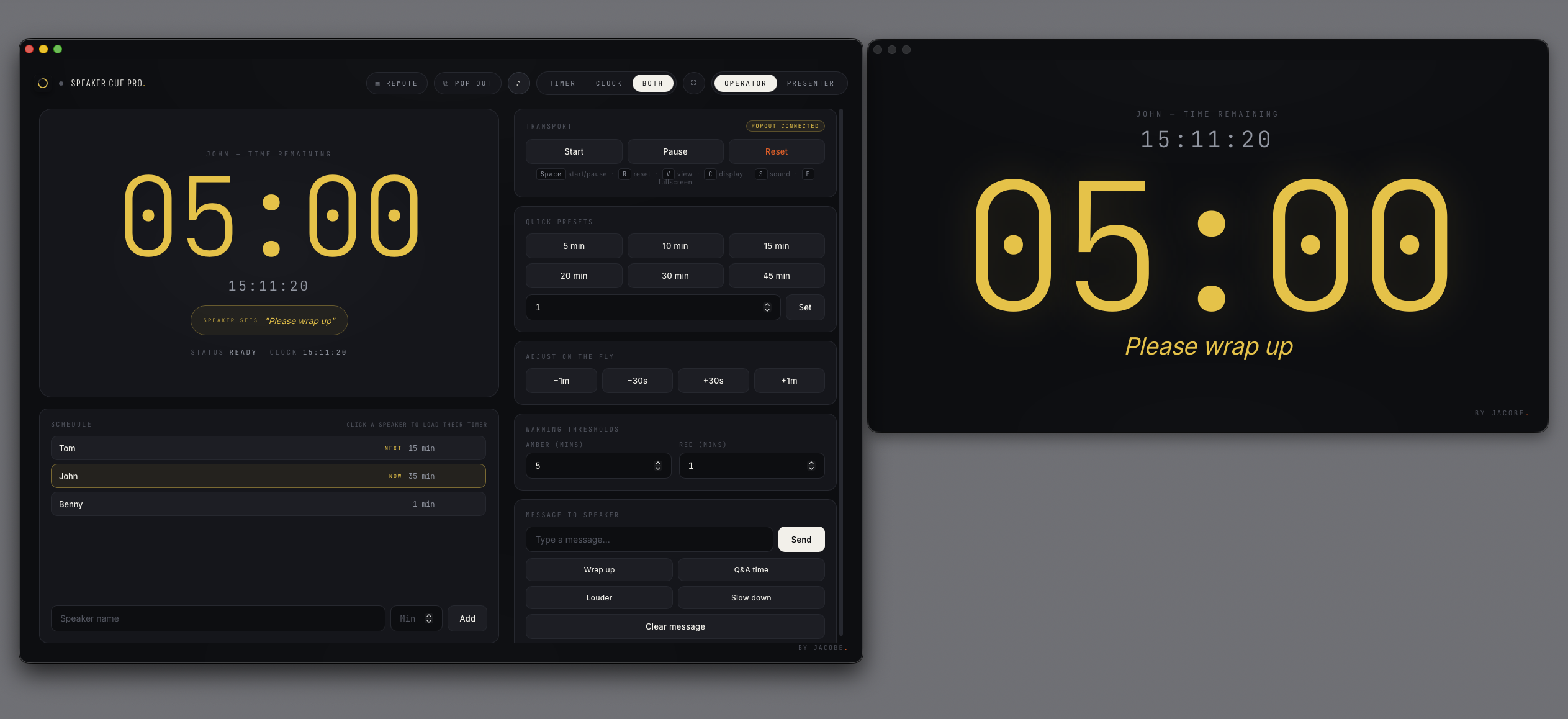
Most countdown timers were made for a phone or a kitchen. Speaker Cue Pro is built for the front of a room: a big, calm, legible podium clock the presenter can read from across the stage, with amber and red thresholds that flood the whole display with colour as their time runs out — so they always know exactly where they stand.
Send private cues without breaking their flow
The feature that sets Speaker Cue Pro apart: while the speaker is mid-sentence, the operator can push a discreet message to the presenter's screen — Wrap up, Q&A time, Louder, Slow down — using one-tap presets or your own text. No frantic hand signals from the back of the room, no awkward interruptions. Just a quiet word, exactly when it's needed.
Operator and presenter views, across two displays
Speaker Cue Pro splits into two: the Operator view stays on your Mac with all the controls, and the Presenter view — the large timer and any messages — pops out to a second display. Send it to a confidence monitor, a projector or a TV facing the stage. It's designed for the real two-screen setups conference and AV teams already run.
Who Speaker Cue Pro is for
Speaker Cue Pro is made for the people who keep live events on time: conference MCs and stage managers, keynote and event producers, church and worship tech teams, AV operators, and anyone running a panel, webinar or awards night where speakers need to stay to time without being rattled.
Buy once. Own it.
Speaker Cue Pro is a one-time purchase of £69 — no subscription, and it keeps working offline. Try it free on a real show first, then enter your licence key to unlock it for good. Purchases and refunds are handled by Lemon Squeezy; see our refund policy.
Speaker Cue Pro FAQ
What is Speaker Cue Pro?
Speaker Cue Pro is a Mac speaker timer for live events. It puts a large, stage-grade countdown on the presenter's screen and lets the operator send private messages — like Wrap up or Q&A time — straight to the person on stage, without interrupting them.
Does Speaker Cue Pro run on macOS?
Yes. Speaker Cue Pro is native Mac software and runs on macOS 13 (Ventura) or later. It works fully offline — no account or internet connection is needed to run it.
Can I use Speaker Cue Pro across two screens?
Yes. It has separate Operator and Presenter views. You keep the controls on your Mac and pop the large timer out to a second display — a confidence monitor, projector or TV facing the stage.
Is Speaker Cue Pro a subscription?
No. It's a one-time purchase of £69. You buy it once and own it — there's no recurring subscription.
Is there a free trial of Speaker Cue Pro?
Yes. You can download a free trial and run it on a real show before you buy. The trial is time- and feature-limited; entering your licence key after purchase unlocks everything.
← Back to all Jacobe apps
 Speaker Cue Pro
Available now
Speaker Cue Pro
Available now